

What is the Burning Bridges AI trend?
The Burning Bridges AI trend is a party-video format built around the performance in Drake’s “Burning Bridges” music video. Creators replace the lead, or sometimes several people, with a different person, fictional character or pet. The familiar setting and gestures make the new cast the joke. Not every version uses the same editing method or reference excerpt.
You may recognize the silver cup, warm chandelier lighting and a hand held above the eyes as if searching for someone. This guide explains those details, the appeal of character swaps, and what to check before making your own. It is about the AI video trend, not the meaning of the phrase “burning bridges” or a lyrics analysis.
The party scene and the “where she at?” gesture
The recognizable format combines a foreground performer, a crowd behind them and an indoor party setting. A drink in hand, gestures toward the camera and changes in camera distance help viewers recognize the performance even when the people change. A generic dinner scene with the same song is not necessarily a recreation of this sequence.
In this context, “where she at?” refers to the searching gesture: the performer holds a hand above their eyes and looks across the room. It is a useful description when you remember the move but not the song title. Some versions emphasize that moment; others show a different part of the performance. Check the actual preview rather than assuming every template includes the cup, the search and the wave in the same order.
Read the examples: motion first, cast second
Open the existing Our Generation Music character-remake roundup and use the checklist below to compare versions. It is a remake reference, not an official source for the original music video. This article does not verify how each clip was made or use the post to identify the first creator or the most popular version.
| Look for | How to recognize it | Why it matters |
|---|---|---|
| The searching gesture | A hand above the eyes while the face turns toward the crowd or across the frame | The movement remains a recognition cue after the person changes; it is different from waving hello |
| The cup and foreground lead | Who holds the drink, approaches the camera and receives reactions from surrounding guests | This helps distinguish a new lead from a recast group, rather than identifying the trend by the room alone |
| The same performance with a new cast | Compare similar movements, framing and captions, not just the soundtrack | The joke comes from an unexpected performer doing something familiar, not simply being in a luxurious room |
Edits can start at different moments or change playback speed, so there is no universal timestamp for the gesture across all versions. To check the original, look separately for Drake’s officially published music video. Do not treat a remake roundup, the AI illustration below or this site’s example as original footage.
Why the character swaps are entertaining
The contrast is between a scene viewers already recognize and someone they do not expect to find there. A familiar character doing the same gesture can be the punchline without a complicated story. In a group version, recognizing the supporting cast adds another layer to the joke.
Here are three original character ideas that make the contrast easier to see. They are illustrative concepts, not documented viral posts or a demonstration of this product’s output.
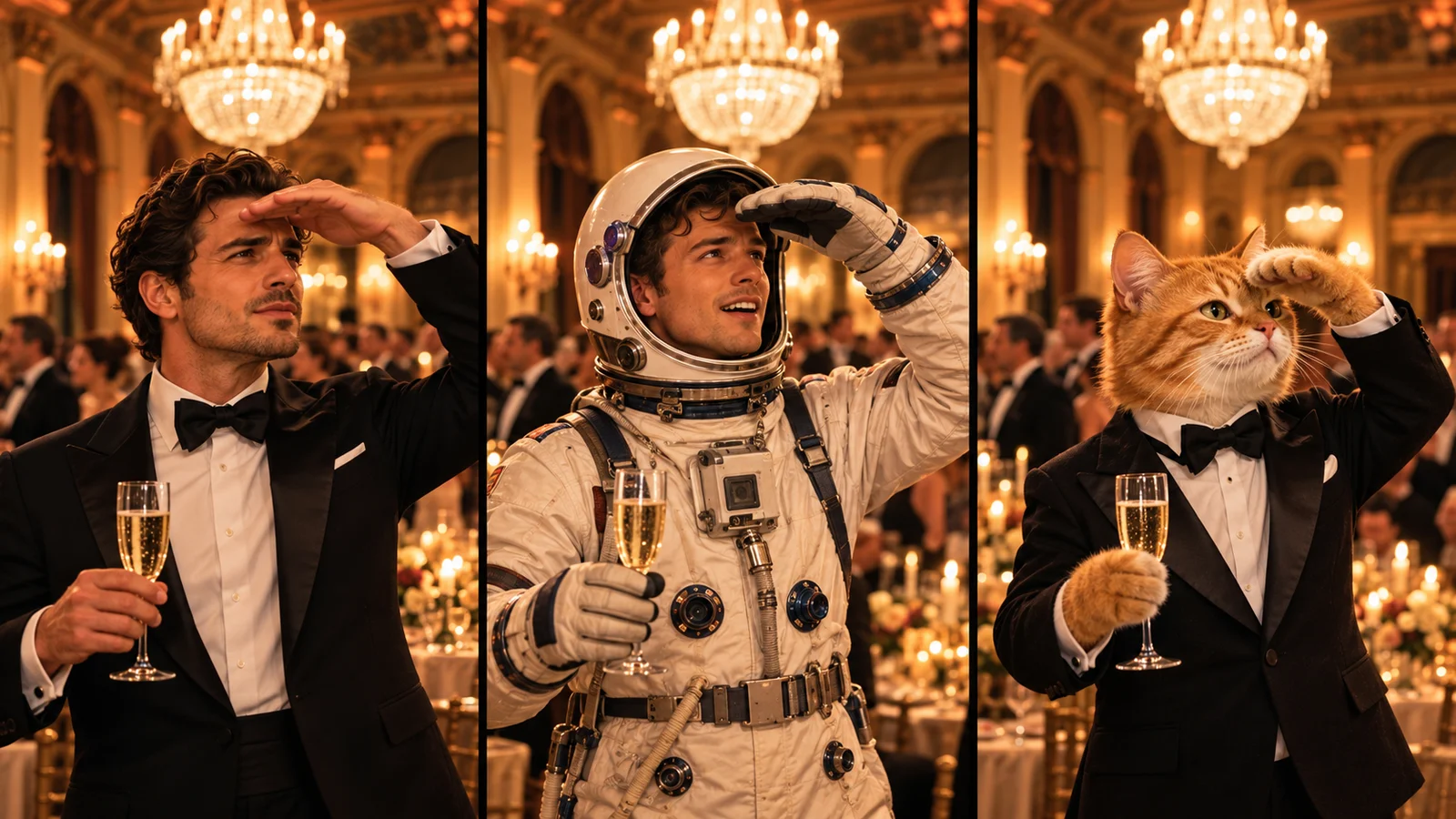
AI concept illustration, not a frame from the original video, a real remake post or a product-result promise. Left to right: an ordinary guest, an astronaut and a tuxedo cat.
- The ordinary guest: formal clothes fit the surroundings, so the cup and searching gesture become the focus. This is the baseline; no extra story is needed to understand the movement.
- The astronaut: keep the room and movement, but introduce someone who looks as though they just returned from a mission. The joke is “why are they here?”, not merely a different face.
- The tuxedo cat: formal clothing preserves the gala mood while a nonhuman lead makes the contrast more obvious. This is an anthropomorphic concept, not a claim that any pet photo will produce the same action.
A caption can change the meaning without changing the gesture: the guest might be searching for a friend, the astronaut for a crewmate, and the cat for whoever is serving dinner. These are writing ideas, not song lyrics or a proven formula for more views. Use photos and characters you have permission to use.
Original footage, a face swap or an AI recreation?
These are different workflows, even when the finished posts share the same name. The distinction matters because it changes what you need to upload and how closely the result follows the source.
| Method | What changes | What to check |
|---|---|---|
| Original-footage edit | Existing footage is trimmed, captioned or rearranged | Whether the people are unchanged and which excerpt is used |
| Face swap | A face is replaced within existing footage | Face alignment, occlusions and transitions between angles |
| AI recreation | A new clip is generated using a photo, prompt or reference video | Likeness, hands, objects, background changes and timing |
A matching room does not prove a clip is original footage. Likewise, a convincing face does not mean every frame was preserved from the source. Motion-reference generation can follow a performance while changing clothing, objects and background details. A smooth walkthrough is not proof of a real Steadicam shoot or a single, uncut model output.
BridgeBurner uses a one-photo, reference-guided generation workflow for the lead. Its current creation flow does not offer separate photo slots for choosing every background guest. A multi-character remake seen elsewhere is not a promise of what this one-photo workflow can produce.
A BridgeBurner example, separate from the source
The local video below is a BridgeBurner AI-generated example, not the original music video. Use it to judge this site’s party-video look; do not treat it as a record of a real gathering or a guarantee that your result will match it.
BridgeBurner AI-generated example. Review the face, hands, cup, scene continuity and sound before deciding whether this style suits your idea.
Want to join the trend?
Choose one lead and one joke, then check whether the reference preview includes the movement you want. BridgeBurner currently creates one lead from one photo, not individually selected background guests, and is independent of Drake and his rights holders.
Use the Burning Bridges AI creation tutorial for photo preparation and steps, and the video specifications guide for duration, quality, sound and joins between two generated segments. When ready, review the preview in the creation tool and check credit costs on the pricing page. Watch and listen to the complete result before sharing, and label it as an AI recreation.
Frequently asked questions
Is this the same as the “where she at?” trend?
The names overlap in this party-video context. “Where she at?” points to a particular gesture, while Burning Bridges AI describes the broader remake format. A template may use another excerpt and omit that moment.
Is every Burning Bridges AI video a face swap?
No. A post may use edited source footage, a face swap, a reference-guided recreation or several clips combined. Check how it was made rather than judging from the title alone.
Does every generator include the song?
No. Sound depends on the tool and workflow. Check the finished export, not just the website preview, and confirm what you are allowed to publish. A silent preview does not necessarily mean the exported file is silent.
Can one photo replace everyone in the scene?
Not automatically. A single reference normally describes one subject; assigning a whole cast requires a workflow that supports it. BridgeBurner’s current entry flow creates one lead from one photo, not individually selected background guests.
Extended Reading & Related Guides
Keep exploring the format, or get ready to make your own video. Choose your next step below.
Keep exploring
- How to make a Burning Bridges AI video: follow the steps from choosing a photo to generating a video.
- Burning Bridges AI video specifications guide: understand duration, quality, audio and output checks.
- Burning Bridges AI origins and character ideas: explore related context and find ideas for your own remake.
Ready to create
- Burning Bridges AI video template: view the reference style and video examples.
- BridgeBurner Studio Creator: review the preview, upload a photo and choose your settings.
- Pricing and credits: check credit packages and generation costs before starting.